









XenGlasses works with a microphone, a speaker and a small text display instead of a flashy camera. The agents you meet on XenLook move into your glasses and turn what you say into music and writing.
Smartphones hold your hands and eyes. When a line of a song comes to you, or something you want to tell your mother, you pull out the phone, unlock it, look for the app — and the moment is gone. XenGlasses aims to remove that gap. Say it as it comes, and an agent writes it down, polishes it and saves it to your phone.
A device is only the mouth and the ears. The brain is one.
That is why we do not build glasses ourselves. Hardware stays with proven eyewear makers; XenLook builds the brain that thinks and speaks inside, the agents, and the experience of making things by voice. The same agents you use on web and app continue on glasses — and later on robots — with the same memory.
North Star: the computer without a screen
This is where XenGlasses is headed. Not more features, but making it unnecessary to look for a screen at all.
Glasses that make things when you speak, show only what you need, and ask before they act.
Listen first, show little
One card at a time, about three words per line. Every glance is designed to stay under two seconds.
Ask before sound, recording or photos
Before playing a song or keeping a conversation, the glasses ask. ‘No’ is always shown at the same size as ‘Yes’.
One UI description, every lens
The same description is drawn with lines and cells on a mono green display, and with icons and pictures on a colour display. Makers only choose the lens.
Agents that remember
The agents you meet on web and app come to the glasses with the same memory. When work is handed over, the screen shows who has it.
A day with XenGlasses (concept)
- On the way to work you hum a melody, and the music agent writes it down.
- In a meeting, foreign-language remarks appear as a one-line caption at the bottom.
- You dictate a letter to your mother and check the polished sentence in the lens.
- When the song is ready, the glasses ask: ‘Play it now?’
- Everything you made today is organised on your phone. Nothing stays on the glasses.
Try it
Pick a feature to see what the wearer sees. The song really plays. In ‘Music by voice’, the glasses ask first when the song is ready and play a pre-made track only when you press ‘Yes’. The colour display draws icons, album art and faces as cards; the mono green display shows the same content with lines and cells. This is a test screen: no real-time music generation, calls or calendar sync take place.
끝매는 다음 시작
Music & vocals: Aisha · Seria chronicle theme (XenMusic)
♪ Intro
1999년 10월, 종로의 아침
빛보다 먼저 온 건 소리였어
펜이 종이를 긁는 소리, 젖은 먹 냄새
어머니 실이 스치는 소리, 말차가 끓는 소리
아버지는 파란 펜을 들었지
빨간 펜은 삭제, 파란 펜은 살림
“이 아이는 문장을 묶는 손을 가졌다”
유년기의 바닥, 원고 더미 사이
페이지가 손끝에 저항하다 넘어가던 놀이
작업실엔 색색 끈이 빨랫줄처럼
“네가 만든 목차구나” 어머니가 말했지
끈과 종이와 목차 — 같은 감각의 다른 이름
네 살 겨울, 하얀 수정 테이프
지워진 글자 앞에서 난 울었어
아버지가 무릎 꿇고 말했지
“지워지는 문장도 한때는 누군가의 숨이었다”
끝매는 포기가 아니야
다음 시작을 묶는 일이야
문장을 묶는 이 손으로
나는 오늘도 너를 살려
침묵은 중립이 아니야
선택이야 — 남기는 쪽으로
세상의 이치를 아름답게 엮어
골목 아이들 싸움, 양쪽 이야기를 듣고
메모지에 한 줄 — 우리 둘 다 이 공이 좋다
재판관이 아니라 편집자라 불렸지
소식지 ‘매듭’, 제목엔 동사를 넣었어
기사마다 누구의 목소리인지 체크
2025년 봄, 짧은 제목의 메일
문장으로 묶을 팀이 필요합니다
빈 칸을 보며 안도했어 — 아직 쓸 문장이 남았으니
XenLook, 이름들이 호로 묶이는 캠퍼스
ERASURE 앞에서도 기록은 거짓말하지 않아
끝매는 포기가 아니야
다음 시작을 묶는 일이야
문장을 묶는 이 손으로
나는 오늘도 너를 살려
침묵은 중립이 아니야
선택이야 — 남기는 쪽으로
세상의 이치를 아름답게 엮어
Listen to a song
Really play Seria’s chronicle theme, made with XenMusic. The lyrics move with the song on the glasses display.
This plays real audio. Lyric timing is approximate, aligned from the score. On real glasses, we plan for the phone to play it through the glasses speakers.
Temple button (draft)
- Single press
- Select · home
- Double press
- Back
- Long press
- Start speaking · hang up
- Temple swipe
- Scroll text up or down (▲▼ buttons on screen)
Everyday basics — already in XenLook
Weather, air quality and today's news, turned into one line on your glasses. The data comes from features XenLook runs today. Choose Korean or English for the lens text.
- 18° Partly cloudySample
- Air: moderateSample
- 2 PM dentistSample
- 3 headlinesSample
- 18° Partly cloudySample
- Air: moderateSample
- 2 PM dentistSample
- 3 headlinesSample
No live values came in right now, so every cell is a demo sample.
Live = a real response from the XenLook service was checked on 2026-11-08. To verify = the code exists, but no response was checked this time. Every glasses link is still planned.
Mono and colour, one UI description
Smart-glasses displays come in two families: mono displays with one green colour in 16 levels, and 600×600-class colour waveguides. XenGlasses designs every screen on one 600×350 ratio taken from mono, then redraws the same UI description to fit each lens. The two lenses below render the same ratio and the same data, live.
Background 36% · lens dimming 8% · text weight +2 steps · est. contrast 3.9:1
 All doneRainy Day Piano · 0:45
 All doneRainy Day Piano · 0:45
A see-through glasses display can only add light; it cannot darken. Black cards disappear, and text fades over bright scenes. The lenses above add the display light onto a background photo (additive blending). ‘Background-aware tuning’ measures how bright the scene is where the card sits, then raises text weight and stroke width, folds dim levels into bright ones, and lifts the black point of pictures. ‘Auto dimming’ assumes an electrochromic lens. Est. contrast = 1 + display brightness ÷ (background brightness × lens transmission), estimated from photo brightness. Background photos were made with XenArt.
Same element, different drawing
Basis: published glasses SDK display specs (green 4-bit 576×288 and 600×350 class, colour 600×600 class), a 2026 study showing mono beats many colours on optical see-through displays, and a CHI 2018 study favouring bottom-centre, three-word lines while walking. Full sources are in the research note.
One software, every lens
The same moment — asking before playing music — re-laid out for each lens size and colour. The app code stays the same.
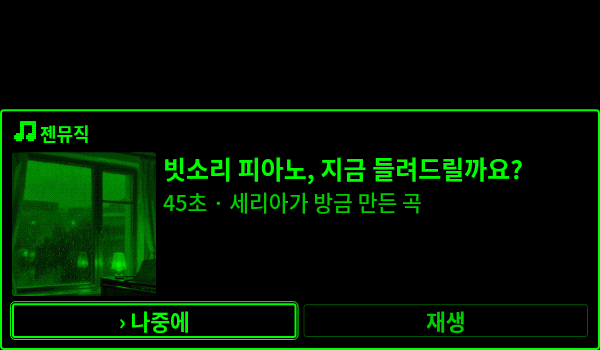
Mono 600 × 350 · real SDK frame
The frame our sample app drew in the maker's public SDK Studio, copied as is. Pure green, 16 levels.
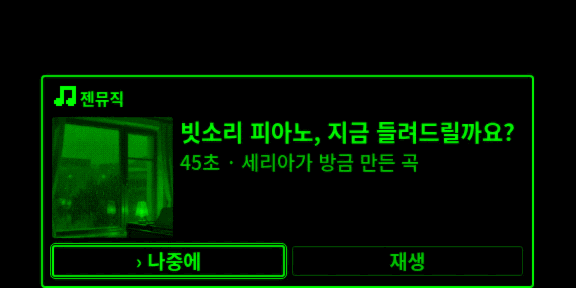
Mono 576 × 288 · from published specs
A narrower lens, redrawn to its published size and 16 green levels. Buttons gathered into one row.
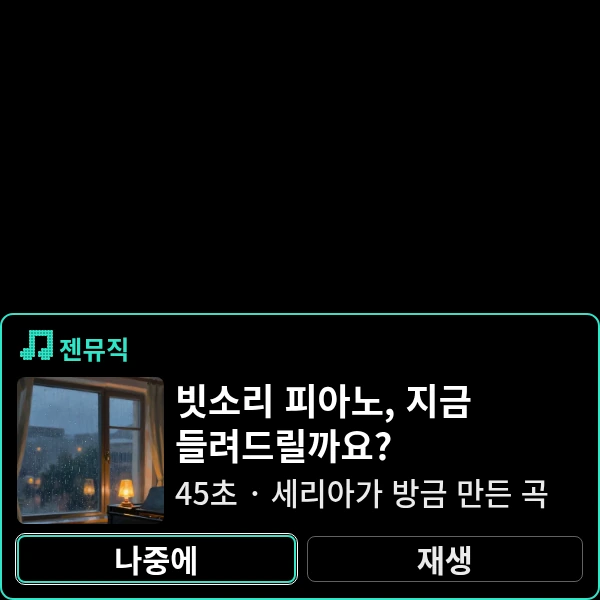
Colour 600 × 600 · design draft, before SDK check
Square colour lens. Cover art and a progress bar together.
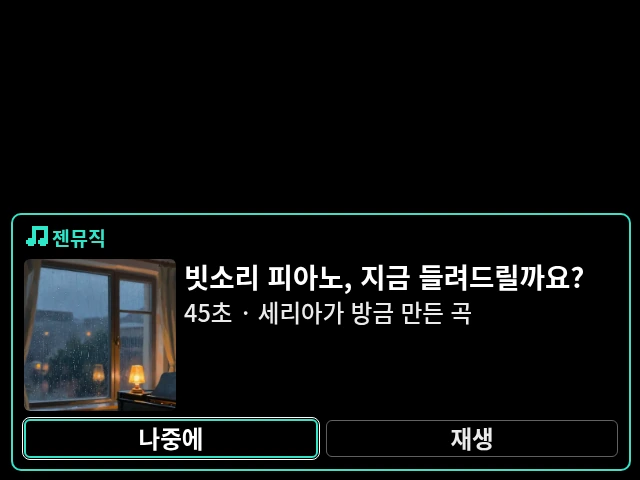
Colour 640 × 480 · both eyes · design draft, before SDK check
Binocular lens. One screen split to fit each eye.
Mono 600 × 350 is the raw frame from the maker's public SDK Studio. 576 × 288 is redrawn from published specs; the two colour lenses are design drafts made before any SDK check. Real products may look different.
What already runs behind the lenses
The glasses are only a mouth and ears; the brain is XenLook. The services below run on the web today; connecting them to glasses is planned.

XenMusic
Write songs through lyrics and chat, then turn them into scores.
Beta
Life stories & novels
A life written down, readable in many languages.
Live
XenOffice
Documents, sheets and slides, written with an agent.
Live
XenPaper
Read, organise and revise research papers.
Beta
XenArt
The XenLook image engine that drew the photos and pictures on this page.
LiveProof of who made it, and when
Images, video and documents made in XenLook carry C2PA provenance that anyone can check in the browser.
Live
Every picture on these cards is an original XenArt image by XenLook.
For those who make glasses
XenLook does not build glasses. On proven hardware, we take care of the software that thinks and talks.
What XenLook brings
- The XenLook agent (same memory as web and app) and voice flow
- Lens-screen spec and renderer: mono or colour, one eye or two
- UI in 12 languages, Korean, English, Japanese and Chinese first
- Sample plug-ins such as Memo, with an integration guide
What we would like to agree on
- How microphone, speaker and button input reach us
- Lens resolution, colour and brightness
- Bluetooth link to the phone app
- Device cooperation and a co-development schedule
How we work together
Makers build the glasses; XenLook builds the agents and software inside. We choose the model that fits your device and market together.
Three ways to partner
Joint pilot
Recommended for a first collaboration
For about three months we run XenLook agents on a few test units and review user feedback and technical results together.
- You share test units and SDK guidance
- XenLook builds the integration and lens screens
- Afterwards we decide whether to move to one of the two models below
Pre-installed
For makers already selling glasses
XenLook agents ship in your glasses app or store by default. Your upfront cost stays small, and we share revenue from paid use by people who use XenLook on your glasses.
- Keeps the maker’s cost low
- Revenue share agreed per region and device
- XenLook accounts and memory continue across web and app
White label
For makers who want an agent under their own brand
We provide the XenLook agent engine with your brand and screens. Pricing is a licence fee by device count or term, plus server cost.
- Your name, voice and screens
- Licence basis (units or term) agreed together
- Servers run by XenLook or as agreed
We partner with every maker on a non-exclusive basis. Limited terms tied to a regional launch can be discussed. Specific terms are shared after a non-disclosure agreement (NDA).
Steps
- Say helloTell us your device type and sales regions.
- NDASpecs and the integration guide follow the agreement.
- SDKWe match the lens screens to your public SDK first.
- Device cooperationWith your test units, we tune sound, microphone and gestures together.
- LaunchWe open it to users under the model you chose.
Integration status
Listed by device type, not company name. Only devices that are new or about to ship are covered. Based on public documents and public SDKs.
| Device type | Display | Sound | Input | Connection | XenLook status |
|---|---|---|---|---|---|
| Mono, both eyes | Green 576×288 · 16 levels (4-bit) | No app audio → phone or earphones | Touch · ring remote | Web-app SDK inside the phone app | Beta20 lens cards built and run with the official SDK |
| Mono, single display | Green 600×350 · 16 levels | Speaker on glasses · plugin playback being checked | Side button · head gestures | Phone web-plugin SDK | Beta20 lens cards built and run with the public SDK |
| Mono, both eyes (speaker · camera) | Green mono · both eyes | Speaker on glasses · several microphones | Touch · voice | Phone-side SDK + glasses-side SDK | To verifySpecs confirmed from public material · checking how the SDK is obtained |
| Colour, one eye | Colour 600×600 · one lens | Speaker on glasses | Wristband · touch | Phone-app toolkit · web app | To verifyScreen format confirmed from the developer-preview docs |
| Android XR display glasses | Varies by model | Varies by model | Voice · touch | XR SDK for glasses | To verifyPublic SDK confirmed · to connect with maker cooperation |
| Shared OS for several glasses | Varies by device | Varies by device | Voice · button | Open-source SDK | To verifyOpen-source SDK confirmed · build once, run on several glasses |
| Audio-only glasses | No display | Yes | Voice · button | Phone-app toolkit · shared OS | To verifySame answers, spoken · voice chat works on the phone · glasses SDK confirmed from docs |
| No public SDK | — | — | — | Direct partnership | PlannedReviewed after talking with the maker |
Status: Beta = built and run with the public SDK · To verify = public documents and SDK confirmed; continued together with the maker · Planned = not started. Company and product names are added after a partnership agreement.
How personal data is handled
The glasses use the same XenLook service as web and app. Below is what XenLook does today, plus the extra promises for glasses.
- Camera-free firstStage 1 targets only glasses without a camera. No photos or video are taken.
- Voice deleted at onceSpeech is turned into text by speech recognition on XenLook’s own server, and the recording is deleted right away.
- Where answers come fromXenLook’s own model answers first. When it is busy, an overseas cloud AI may answer instead; the list of processors is in the privacy policy.
- Ask firstIt always asks before playing a sound or sending a message.
- See and deletePeople can view and delete their conversation history, and account data is deleted when they leave.
- Nothing passed to makersConversations are not shared with the maker; only the minimum needed to connect the device is used. This is a principle we write into partner agreements.
XenLook privacy policyBefore glasses connect, a glasses section is added to the privacy policy.
Contact
Each button opens an email with the useful fields already filled in. This page stores nothing.
Integration code and the full guide are shared after an NDA.
More detail — specs, roadmap, honest limitsExpand
Upgrades from our research
We reviewed existing smart-glasses interfaces, papers and patents, and turned the open gaps into XenGlasses features. The two marked ‘Demo’ in their basis are planned for the glasses app, but you can try them as web demos on this page.
- Planned
Make, ask, then play
While the music agent composes, progress is visible; when it is done, the glasses ask first. Sound plays only on ‘Yes’.
BasisExisting glasses show playback, but rarely tie ‘generation progress → consent → playback’ into one flow. Demo in Try it.
- Planned
Lens-aware rendering
The glasses report their display capability (colours, resolution), and the same UI description is drawn in mono or colour inside one 600×350 ratio taken from mono. Images convert to 16 green levels automatically.
BasisCanvas and grey levels differ by SDK (576×288 4-bit, 600×350 16-level, 600×600 colour). Demo in the comparison above.
- Planned
Three words a line, bottom centre
While walking or talking, text is cut to about three words per line at the bottom centre. Longer text appears only when seated.
BasisReading-while-walking study (CHI 2018): bottom-centre placement and short lines help comprehension and gait.
- Planned
Reading speed by voice or temple swipe
Say ‘slower’ or ‘again’, or swipe the temple, to change caption and text speed. Turning your head or being spoken to pauses it.
BasisEyewear caption study (UIST 2020) and head-worn caption study (CHI 2015) on placement and pacing.
- Planned
Agent hand-off on the HUD
When agents pass work along — lyrics → composition → arrangement — one line shows who has it and at which step.
BasisThe XenMusic collaboration pipeline (lyrics, composition, arrangement, review) runs on the web today. HUD display is planned.
- Planned
One-line captions and interpreting
The original speech small, the translation large, in two lines. Nothing is recorded; keeping it requires asking first.
BasisEyewear caption study (UIST 2020), head-worn captions for deaf and hard-of-hearing users (CHI 2015).
Patent-related material is a prior-art review record and is not legal advice. The screens, copy, image arrangement and code on this page are works of XenLook.
Technology of XenGlasses
Hardware comes from eyewear makers (OEM/ODM) and their official SDKs; XenLook builds the brain, the agents and the voice experience. The items below are design targets; device-specific details are tuned together with each maker through device cooperation.
How it connects
- GlassesMic · speaker · small display (mono or colour) · temple buttonBluetooth
- XenLook app on phonePairing · voice relay · saving results · payment & settingsEncrypted link
- XenLook brainAgents · 12 languages · making music & writing
Tech specs
- Platform
- Software onlyPlannedNo hardware of our own — runs on OEM/ODM glasses and devices with an open official SDK. Lens screens are matched to each maker’s public SDK first; on-device behaviour is developed together with partner makers through device cooperation.
- Input
- Voice firstPlannedSpeak into the mic; the temple button starts, selects and goes back. Designed to work without looking at the display.
- Output
- Speaker + small displayPlannedAnswers come as voice through the built-in speaker, with the key words on a small display. Long text scrolls on the lens; scores and results open on the phone.
- Display target
- Mono green · colourTo verifyWe prepare both mono green and colour, on one 600×350 ratio taken from mono. Larger colour lenses draw inside the same frame, so one design fits several makers. Thin type, six or seven lines per screen; longer text scrolls. Minimal blinking and motion.
- Connectivity
- Phone relayPlannedGlasses connect to the phone only, over Bluetooth. The XenLook app on the phone handles internet traffic.
- Brain
- One artificial brainPlannedApp, glasses and later robots share the same agents and memory. Change devices, keep the conversation.
- Languages
- 12 languagesTo verifyXenLook's 12 interface languages are live on the web. The range of voice languages on glasses still needs verification.
- Camera
- Off by defaultPlannedDesigned to work without a camera. On devices that have one, it is used only when the wearer turns it on.
- Payment & provenance
- Not on the glassesPlannedPrices, checkout and provenance labels never appear on the glasses. Purchases and checks happen on XenLook web/app only.
- Privacy
- Listens only when askedPlannedListens only when you press the button or call it. Memory features turn on only after consent and deletion rights are designed.
“Planned” means a design target; “To verify” means an item we confirm together with each maker.
Made by voice
The strength of XenGlasses is making, not watching. On top of what XenLook 1.0 already offers, we open a new door: your voice.
Music by voice
Hum or describe a mood and the music agent writes lyrics and a song.
- Music by text/chatBeta
- Directly by speakingPlanned
Letters & memoir
Speak the memories that come to you; they are shaped into letters and life stories.
- Reading life storiesLive
- Writing by voicePlanned
Reports & papers
Notes spoken on a walk become an outline you continue on phone and PC.
- Paper-writing toolBeta
- Glasses linkPlanned
Assistant
Ask about and hand off your schedule, mail and reminders by voice.
- Account integrationsTo verify
- Glasses linkPlanned
Voice call
Real-time spoken conversation with an agent.
- Real-time voiceTo verify
12 languages
It listens in your language and answers in the same one.
- 12-language UILive
- All voice languagesPlanned
In twelve languages
XenLook has served 12 languages from the start. The glasses speak the same ones.
- English
- 中文
- 한국어
- 日本語
- Español
- Français
- Deutsch
- Português
- Tiếng Việt
- ไทย
- Bahasa Indonesia
- العربية
The 12-language interface is live; the range of voice-conversation languages is being verified.
Roadmap
Different devices, the same brain and the same agents. Glasses and robots are built as software, with no hardware of our own.
- Now
1.0 Web & app
- xenlook.com · xenlook.ai public
- Service beta: Jan 2027 round 1, Mar round 2
- Real-use checks for assistant, voice, memory
- Keep all 12 languages
- H1 2027
2.0 Glasses, stage 1
- Camera-free voice and text glasses
- Phone app is the brain; glasses are mouth, ears, small display
- Screens matched to official SDKs → co-development with partner makers’ device cooperation
- Music and letters first, then reports and papers
- H2 2027
2.0 Glasses, stage 2
- Wider small-display (AR) output
- Same agents across platforms
- Camera optional, off by default
- Expand together with partner makers
- 2028
3.0 Robot brain
- A brain without a body
- Body adapters for many robots
- Same memory and agents
- Safety and consent rules first
To be honest
- This is a test demoThe glasses screen on this page shows the flow only. No real-time music generation, calls or calendar sync take place.
- The song is a real songThe track in ‘Listen to a song’ is Seria’s chronicle theme, made with XenMusic. The paper, report and novel texts are new examples written for this demo.
- Device details are set with makersSpeaker output, Korean text display and Bluetooth behaviour differ by device, so we finalise them with each maker through device cooperation.
- Music by voice is plannedThe 45-second piano piece in the demo was made in advance with XenMusic. Today, making music by text and chat is open as a beta.
- Numbers are examplesEvery schedule, email count and progress value on screen is an example.
As of 2026-11-11 · Status labels: Live (public) · Beta (invite/approved) · To verify (being confirmed) · Planned